


|
|
|
|
|
The Weather-Pro weather station can be connected to a computer either:
This section of the document gives detailed instructions on the connection and testing of the weather station using these modes of operation.
The station can also be configured to dial a pocket pager if alarm conditions occur. This will also require the connection of a modem to the local telephone network.
|
|
|
|
The Weather-Pro weather station is supplied with a 15 metre communications cable terminated in a RJ11 plug. This cable is permanently connected to the weather station. This RJ11 plug connects directly to a Comm port socket (serial communication port) at the rear of you computer with the RJ11 to 9pin D adaptor supplied. (serial communication port sockets may be on the side of some lap tops).
If the 15 metre communications cable is not long enough to reach your computer, you will require a RJ11 serial communications extension cable. The RJ11 plug is not a weatherproof connector so the cable connection between the 10 metre communications cable and the extension cable must be made weatherproof.
The 9pin D adaptor can be connect to any available serial communication port socket on your computer. If the only available port has a 25 pin D socket a 9 pin D male to 25 pin D female adaptor will be required. This can be supplied by your Weather-Pro agent or computer store.
|
|
|
|
If required, the Weather-Pro weather station can be connected to a remote computer using a modem connection.
The weather station is supplied with a 10 metre communications cable terminated in a RJ11 plug. This cable is permanently connected to the weather station. This RJ11plug connects via an optional modem adaptor cable to most Hayes compatible modems.
If the 10 metre communications cable is not long enough to reach your modem, you will require an optional RJ11 serial communications extension cable. The RJ11 plug is not a weatherproof connector so the cable connection between the 10 metre communications cable and the extension cable must be made weatherproof.
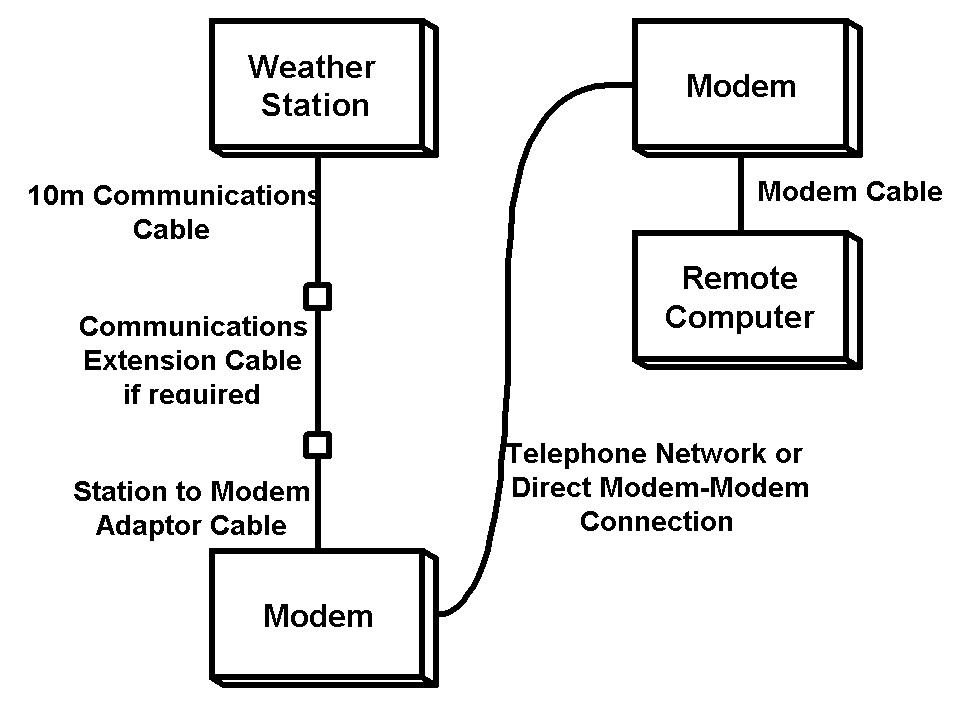
Before being placed on site, the modem must be initialized by the Weather-Pro Software. The modem is connected to any computer, running the Weather-Pro Software, using the cable and connection instructions supplied with the modem. The procedure for the initialization of the modem is covered in the Weather-Pro Software section of this document. (See: Modem Initialization)
The modem can communicate with the remote computer over the telephone network or via a direct modem to modem connection. Follow the instructions supplied with the modem for connection to the telephone network or direct modem to modem connection.
The remote computer will also require a modem connected to the telephone network or via a direct modem to modem connection. The remote computer modem may be internal or external. If it is an external modem it must be connected to a Comm Port (serial communications port) with the cable supplied with the modem.
Once all modem connections have been made the Weather-Pro Software can be used to test communications through the modem system.
|
|
|
|
If required, the Weather-Pro weather station can be configured to dial a Pocket Pager when alarm conditions occur. This requires a modem and "weather station to modem" connection.
The Weather-Pro weather station is supplied with a 15 metre communications cable terminated in a RJ11 plug. This cable is permanently connected to the weather station. This RJ11 plug connects directly to a Comm port socket (serial communication port) at the rear of you computer with the RJ11 to 9pin D adaptor supplied. (serial communication port sockets may be on the side of some lap tops).
If the 15 metre communications cable is not long enough to reach your computer, you will require a RJ11 serial communications extension cable. The RJ11 plug is not a weatherproof connector so the cable connection between the 10 metre communications cable and the extension cable must be made weatherproof.
Before being placed on site, the modem must be initialized by the Weather-Pro Software. The modem is connected to any computer, running the Weather-Pro Software, using the cable and connection instructions supplied with the modem. The procedure for the initialization of the modem is covered in the Weather-Pro Software section of this document. (See: Modem Initialization)
The modem communicates with Pocket Pagers over the telephone network. Follow the instructions supplied with the modem for connection to the telephone network.