


|
|
|
|
|
While every attempt has been made to ensure the the Weather-Pro Software is free from any errors, it is possible that the user may encounter a software bug. This will usually result in the display of a Run Time Error message box. When you click the OK button on this message box, program operation may return to normal or the program may shut down. If this occurs:
If the Weather-Pro service staff require any further information they will contact you by reply email. They will also provide you with a updated version of the program when the bug has been fixed.
Example of a Bug Report
While closing a Summary Report window the following Run Time Error message appears
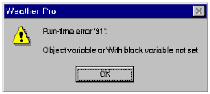
This bug is reported by emailed as follows:
From: John Smith john.smith@someaddress.com.au
To: service@weather-pro.com
Subject: Bug Report on Weather-Pro Software
Error Number: 91
Error Message: Object Variable or Width block variable not set
Error occured while closing Summary Report
Computer: Pentium 200MHz
Operating System: Windows 98
Software Version Number: 2.6
Screen Display: 800x600
Station Serial Number 0011324