|
|
|
|
|
The Evapotranspiration Report Module is purchased as an axillary module to the Weather-Pro software.
When available the Evapotranspiration Report is available from the Tools menu.
Select Tools... Evapotranspiration
You will see the Data selector
Select the End Date for the report (The Start Date and Times are disabled, the field list has 5 fields pre-selected which cannot be changed)
Click the Print icon to print the report or
Click the Edit / Copy icon to copy the report to the clipboard.
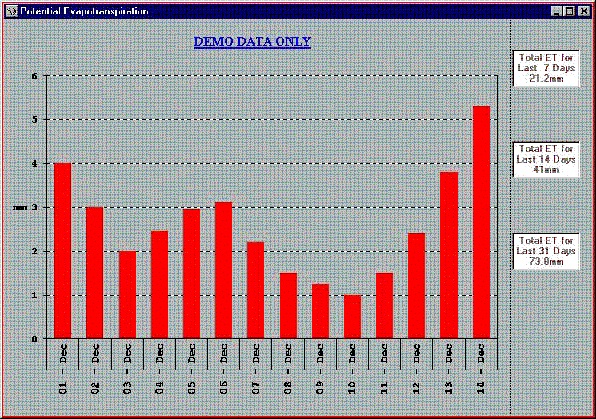
The graph shows the daily PET for the last 14 day's and the boxes on the side show the total PET for 7,14 and 31 day's (If this data is available in the database)
The first and last day's data may be incorrect if the database does not contain the full day's readings.
If Evapotranspiration has not been installed on this computer (a separate program) or for this station, then the menu item will show "Demo Evapotranspiration" and a fixed sample set of results will be displayed.